Coach the Whole Week.
Not Just the Ninety Minutes.
Your team’s season in one account: the calendar, training plans, lineups, substitutions, scouting and tryouts, for every player on your list, and AI match reports from any video. When a family joins, the home training you set comes back counted. Nobody ranked, and nothing reaches you without a parent’s yes.
one account
team session
season report
ranked

You see them twice a week. The rest of the week decides the season.
What a player does between sessions is the part of coaching nobody can see, and the part that shows up on match day.
The schedule in one place, the lineup on paper, the scouting notes in your head. Here the calendar, the lineup, the clock and the file on Saturday’s opponent are one account.
Ninety minutes of video is a Sunday gone. Send it here and read a written report on how the team played, with the moments that turned it.
You set it at practice and hope. Here the family’s phone hears the ball and counts the touches, and a Target you set comes back as a count, not a promise.
Westside U15 · this week
Fall seasonWaiting for you
- Write a scouting file on Riverside FC
- Plan Thursday’s training session
- Set a return date for an injured player
Next match
Riverside FC
The season
W5 D2 L1
Saturday’s squad
15 of 18
Saturday, ready by Thursday.
Home reads your team’s week off the other pages and lists what is still waiting, most pressing first. Each job opens the page that does it, and drops off the list once it is done.
- Who can play, in one count: injuries you logged and the families who said their player can’t make it.
- The lineup, dragged into the formation you play and shared as a team-sheet picture.
- The clock, with planned changes and every player’s minutes saved to the calendar.
- The opponent, in a scouting file beside your record against them.
- The odds, from three or more of your own results, with home and away counted. A guide, not a promise.
Run the whole session from your phone.
Pick stations from the drill library, split the players into groups, and run every round on one clock while a second phone shows the board. At the finish, tick who was there; each player’s minutes go to their family to confirm onto their own record.
- Planned against the calendar. The Training Planner times each block against the session you already put on it.
- Counted as it happens. Drill Sessions keeps the reps that came off, drill by drill.

Thursday session
Round 2 of 4- Wall passesBlue · Ava R., Ben T., Cal M., Dev P., Eli S.
- Close control: toe taps & sole rollsGreen · Finn O., Gio L., Hana K., Ivy D., Jay B.
- 1v1 to a gateGold · Kai W., Leo N., Mia C., Noa F., Owen H., Pia J.
Send the match. Read how your team played.
Upload the video or paste a YouTube link. An AI model reads the match and writes it up for a coach: what happened, how both teams set up, the moments that turned it, and what to work on. A second opinion, not a verdict.
AI video analysis is not available in the beta yet, so Match Intelligence and Live Analysis are not open to coaches. We will say here when they open.
Match Intelligence
A written report from any match video: overview, tactical analysis, key moments you jump to in the video, how the two teams compared, and three to five coaching takeaways.
Live Analysis
The video read five minutes at a time, so moments appear while the rest is still being read. Follow one shirt number, then read the written summary.
Team Assistant
Ask in plain words, “who has played the fewest minutes this season?”, and get an answer from your team’s own record. It never invents a number, and says what to log when the record cannot answer.
Match Overview
An even first half turned after the break, when Westside won the ball higher up and the equaliser came from a turnover inside Riverside’s half.
Key Moments
- 23′Riverside switch play left and score from the far post.
- 51′Westside press the goal kick; the equaliser comes from the turnover.
- 74′A third-man run down the right sets up the winner.
Coaching Recommendations
Keep the higher press after a goal kick; work on the far-post runner when the ball is switched.
Overview, tactics, key moments, team comparison and coaching recommendations, in every report.
A record of the season that writes itself as you coach
Log a session, a match or a minute on one page and every other page reads it.
Progress Tracker
Each player’s season from the attendance and match minutes you already logged. Nothing to type twice.
Goal Setting
Goals measured from the calendar, and each player’s own Targets counted. Their own past, never another player.
Injuries and load
An injury log with return steps, and seven days of load against a usual week. A coach’s guide, not a medical measure.
Tryouts
A trialist board with one-to-five ratings from every coach watching, compared side by side, so the decision is the staff’s, written down.
Match Review
Every match from what you logged, with your own review and a link families can open for six months.
Self-Review Links
A private link for each player: your note on their season, and room for them to write back. At the end of it, a season report to their parent, never a ranking.
Everything on the Coach plan
Grouped by when you reach for it. Every tool below is in your account from the first day.
Match day
- Lineup Builder. Drag from the squad, see who’s available and their minutes, and share a team-sheet picture.
- Substitutions. Match-day mode keeps the screen awake, with planned changes and every player’s minutes saved. Tap goals, assists, shots, saves and cards as they happen: the board keeps the score, each player’s season adds up, and each family sees their own player’s line. Share the score live with one link: no app, no names, just the score and the minute.
- Opponent Scout. A file on each opponent and your record against them.
- Pressure Map. Two taps a press, mapped over nine zones.
- Match Predictions. Win, draw and loss chances from your own results: a guide, not a promise.
- No signal at the pitch? Taps on the register and the Substitutions board are held on your phone and sent when the signal comes back.
Training
- Training Planner. Blocks timed against the session on your calendar, from templates or your own, each with a set-up drawing you can change and print.
- Session board. Stations, groups and one clock from your phone, and a board for a second phone.
- Drill Sessions. Count the reps that came off, drill by drill, and watch the trend.
- The Chalkboard. Rebuild a moment from your own match. Spatrian proves it can be shut and in how few moves, your players solve it on their phones after a blind first look, and you see what the team did not see, as dots, never names.
- A ready-made season. One for each age group from U14 to U18, blocks of weeks with a theme and the drills each leans on, copied onto your calendar as your own plan. New to coaching? Getting started on your Home ticks off the setup steps as you do them.
- Emergency sheet. Every player’s allergies or medical line and who to call, one tap from dialling, kept on your phone for a field with no signal. A family shares their card with you; you type the rest from your club’s form.
- Match Calendar. Import the league’s schedule from its calendar file, matches and sessions as weekly series, families asked who’s coming (yes, no or maybe, with a reminder 48 hours before), a register that starts from their answers, sign-ups for snacks, drivers and volunteers with a reminder the day before, and a private feed for your phone’s calendar.
The squad’s season
- Teams. Your squad, your seasons and your results, with players connected on My Players added in a tap. A new season can start from last season’s squad, their record left with the old one.
- Spreadsheets in and out. Paste a squad or upload it as a CSV file. Download the roster, each player’s season, the register and the tryout board as CSV.
- Helpers. Invite up to three to work on your teams with your plan and your credits. They never see My Players, because those families connected to you.
- Season agreement and dues. A code of conduct each parent accepts per player, and dues you mark paid, with a reminder to the rest. No money moves through Spatrian.
- Progress and Goals. Each player’s season from attendance and minutes, and goals measured from it.
- Injuries and load. Return steps and a week’s load against a usual one. Not a medical measure.
- Tryouts. A trialist board, with ratings from every coach watching, side by side.
- Team forms. A medical release, a photo and video consent and a concussion acknowledgement, written once in plain words. Choose which your team needs and each family signs per player. Not legal advice, and a league’s own forms may still be required.
- Team kit. What the team owns, who has it, and what the next two weeks ask for, read from your session plans. Hand it to an equipment helper.
- Sponsors. Who gave what, for which team and season, whether it arrived and what you owe back, with a thank-you and a line families see on My Team. Money is recorded, not taken.
Feedback that travels
- Match Review. Each match from what you logged, your review, and a link to send families.
- Self-Review Links. A private link per player: your note, and their answer back.
- Season reports. Eight skills marked 1 to 5 and a note, sent to each player’s parent alone, starting from your own words last season if you like. Never a ranking.
- The coach’s word. When a family asks, confirm a season on their player’s profile.
- Home. Your team’s week and the jobs waiting, most pressing first.
Your players at home
- My Players. Every player whose parent typed your code, with what their verified profile and Targets show.
- A code for each team. With two or more teams, each has its own code, so a notice, a who’s-coming ask and your calendar can reach that team’s families alone.
- Targets and notes. Propose 300 touches by Friday, or what you said at practice, to all, none or one team in a tap; the family accepts it.
- Your schedule in their week. Your calendar copied into each player’s plan, light before a match.
- Your players, together. The team’s home work as counts. No row names a player.
- Team notices. “Training moves to 6pm Thursday” to every connected family, by email, on their My Team, and as a notification on any phone they switched on. One-way, so no group chat.
- Who’s out. The sessions families say a player will miss, with an email if you want one.
- Your week, every Monday. One email with the week’s sessions and matches, families’ replies, who’s out and what came of your proposals. Nothing in a quiet week, and one switch turns it off.
- Your credentials. List your safeguarding course, background check, first aid and license. A parent sees them before connecting, marked as declared by you and not checked by us.
- Your coaching résumé. Your history, your declared checks and, if you tick it, this season’s counts, on one page for a new club. Typed by you, and it says so.
AI, with credits included
- Match Intelligence. A match video or a YouTube link becomes a written report, its key moments a tap to that point in the video.
- Live Analysis. Moments filed five minutes at a time, then a written summary.
- Team Assistant. Questions answered from your team’s own record, and nothing else.
- Credits every month, and more whenever you need them.
Set Pieces and the Staff Hub are for club staff accounts we set up with a club. Ask us about a whole club.
Where each tool fits
An example week with a Thursday session and a Saturday match, run from your phone: Home, Calendar, Plan and Squad sit on a bar at the bottom of the screen.
- Mon
Plan Thursday’s session; ask who’s coming Saturday.
Training Planner, Match Calendar - Tue
Propose 300 juggling touches by Friday.
My Players - Wed
Post a notice; see who trained at home.
Team notices, My Players - Thu
Run the session from your phone.
Session board - Fri
Pick the lineup; read the file on Riverside.
Lineup Builder, Opponent Scout - Sat
Run the changes on one clock.
Substitutions - Sun
Send the video; read the report.
Match Intelligence
Manage the whole squad. More when their family joins.
You never need a family to sign up for you to coach their player here. Each step a family takes adds something for you, and for them.
1 · Managed
A name on your squad
Nothing from the family. Covered by your Coach plan.
- Calendar, attendance and match minutes
- Lineups and substitutions
- Injuries and load, goals and progress
- Tryouts and drill counts from the sideline
- A self-review link and the match review link
2 · Connected
Their family types your code
On the family’s own free account.
- Everything in Managed
- “Can’t make it” marked by the family, on your register
- Your notices and notes reach them
- Your schedule in their week
- A verified profile, and your word for tryouts and college
3 · Counted at home
Their plan includes the drills
The Player plan or Family.
- Everything in Connected
- Their phone hears four drills and counts the touches
- Your targets come back as real numbers
- Their home sessions in your team view
- The Audio Coach, the lessons and the drills for the player
The home training you set comes back counted, so Tuesday’s session starts from what they did, not what they say they did.
Your targets in their week, a coach at home on the drills, and a record of their own work to show at a tryout.
Their own account and their own plan. You see whether a player can be counted at home, never what a family pays.
Set it at practice. See it come back counted.
Hand out your code and each family connects through you. On four drills the phone listens for the ball and counts the touches, so a Target you set comes back as a number the phone heard.
- A code, not a search. A parent types your code on their player’s My Team page. You never look a family up.
- Propose; the family accepts. A Target or a note goes to the players you tick, and lands only when a parent says yes.
- Your schedule in their week. Light before a match, rest after it, their own work on the free days.
- Coached at home, too. Before a drill, the player’s screen shows what to watch for and what to say, from coaching points a person at Spatrian approved.
- Team battles. Challenge another coach’s squad by their code. For seven days each squad’s touches the phone heard are added up and divided by the players on the list, so the bigger squad does not win by being bigger. Players see the two team names and the totals, never a name or anyone’s own count.
- What you read is what a parent sends. First name and initial, the profile’s own figures and the Targets. No hours, grades, notes or video.
Your players, together
Totals and counts across your list. No row names a player, and nobody is ranked.
Home sessions heard, week by week.
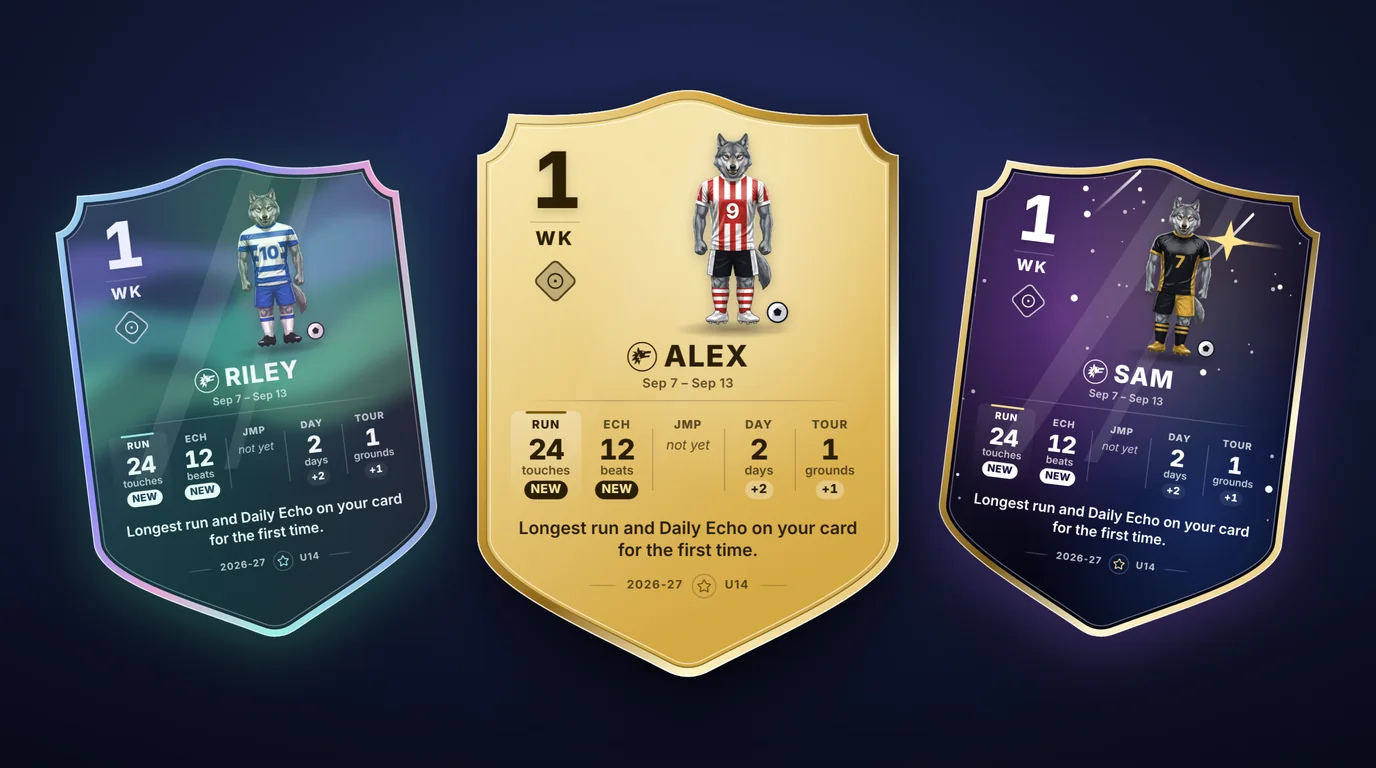
A card they want to open every Monday
Each player’s week becomes a trading card of their own numbers: the touches the phone counted, the days they trained. Beat a best and it turns In-Form gold. It is the player against their own last week, never against a teammate, so it motivates without ranking your squad.
- Their player, their kit. The Pro or an animal athlete, in colors, a number and a name they choose.
- Earned, never bought. New card styles open as they train and their XP grows.
- Theirs, not a league table. The card stays with the family. You see the Targets and the counts.
What you see, and what you never will
Every family keeps its own account and its own player’s record, and a parent decides what anyone outside the family sees.
A parent says yes first
A player reaches your list only when a parent types your code, and a Target or note lands only when the family accepts it.
Nobody ranked
Your list is alphabetical, the team view is counts, and each player is measured against their own past. There is no leaderboard of your players, and a team battle shows squad totals only.
No audio kept
The phone hears the ball and keeps the moment of each touch. No sound is stored or sent, anywhere.
A player’s record is theirs
You read the profile’s own figures and the Targets. Hours, grades, family notes and video stay with the family.
Show Families What the Season Built
For ECNL, MLS NEXT, Girls Academy, NPL and state-premier teams: what each player kept between sessions, measured on their own phone, in the places a club is judged.
A showcase book for college coaches
Print one book of the players who chose to be in it, by shirt number, each with only the measured numbers they picked: personal bests, and skills that held after days away. No email or phone is printed, and nobody is ranked.
The break, and what held over it
Name the summer or winter break and set Targets over it. At the first sessions back, the phone checks each skill against the player’s own last session, and you read how many held, came close or faded: counts, never names.
A development plan for every player
Propose up to three skills and a goal for the term. A parent accepts it, the skills lead the player’s home sessions, and your season report shows each one beside your own mark and what the phone measured.
One curriculum across the club
The club’s director lays out the season a block at a time. Every coach in the club sees it first when they plan, copies it onto their team, and the director sees how many teams use it.
Call-ups that count in the week
Call a player up to an older team’s match. Once a parent accepts, the game goes in their week, so their training load counts it, and that team’s coach sees the call-up on the match.
Your match film, linked
Paste the link to the film your club already records on Veo, Hudl, Trace, YouTube or Vimeo. Families open it from the match report. Spatrian keeps no video.
The Terms, in Plain Words
What a coach and every family can count on, plan or no plan.
No ads, anywhere
Not to you, not to your players and not to their parents. No advertising cookies, no tracking pixels, and we do not sell data.
No hardware to buy
No smart ball, sensor or camera rig for any player. Each family’s own phone does the counting.
Try a player’s phone first
The juggle counter needs no account. If it hears the ball on their phone, the Targets the phone counts will.
Their record outlasts the season
A player’s measured record is their family’s, so it goes with them when they change team, and stays theirs when your plan ends.
Straight answers
A coach of a school or club team of players aged 13 to 18, paid or volunteer. It is your own account: your team’s season, your players at home, and AI match reports.
You hand out your code, eight letters and numbers on your My Players page. A parent types it on their player’s My Team page and the player appears on your list. With two or more teams, each team also has a code of its own. Only a parent can connect or disconnect, and you never search for a family.
Their first name and initial, their age group, what the phone measured on the drills it hears, and the Targets their family accepted. Never their hours, grades, the family’s notes or video, and never a comparison with another player.
Each AI action costs a number of credits: a match report or a Live Analysis run more, a Team Assistant question less. Your plan includes credits every month and they are used first; packs you buy never expire. The cost is shown beside each button before you press it, and an action that fails gives its credits back.
It is a second opinion, not a verdict. It reads the video you send, so a clear, wide angle from the halfway line reads best. The Team Assistant answers from your team’s own record and says so when the record cannot answer.
No. On four drills the family’s phone listens for the ball and counts the touches. No sound is stored or sent; what is kept is the moment of each touch.
No. Coach the way you coach: plan the session from a template or your own, run it, and count the reps drill by drill. The Audio Coach is there for a family that wants it at home, and on four drills the touches their phone hears come back to you as counts; every other session is logged by hand and lands in the same record.
No. The calendar, training, lineups, substitutions, scouting, tryouts and the AI work for your whole squad from your account alone. A family that connects with your code, on their own free account, adds your notices, notes and schedule in their week; one whose plan includes the drills adds the touches the phone counts, so your targets come back as real numbers.
Yes. On any practice or match, press Ask families to reply. Each family connected to you gets an email, and a notification on any phone they switched them on for; a parent answers yes, no or maybe in one tap, and anyone who hasn’t answered is reminded 48 hours before. You see the tally and each player’s answer in the register, and a no starts that player as absent. A player answers through a parent.
On the Emergency sheet. A parent fills in their player’s card once and ticks you to share it; for anyone else you type the line from your club’s registration form. Numbers are one tap from dialling, and you can keep a copy on your phone for a field with no signal.
Yes. Invite up to three helpers from My Players. A helper works on your teams with your plan and your AI credits, and never sees My Players, because those families connected to you. For a club that wants shared staff accounts, the Staff Hub and Set Pieces, get in touch through the contact page and we’ll set it up with you.
A soccer training platform for players aged 13 to 18 and the people who develop them, in four parts that each work on their own and connect when you want them to. The player trains and keeps one record of it, their coach sets targets the family’s phone counts, their personal trainer sends the family a private report after every session, and for a homeschool family the same sessions become the PE record.
No. Each part stands on its own. Use one, or connect them: a player needs no coach or trainer, a coach needs no family to sign up, a trainer’s families need no account, and connecting by code is always your choice.
Players aged 13 to 18, in three age bands: U14, U16 and U18. The drills, lessons and games are written for those ages.
Passing this on? Print this page on one sheet (PDF)
First beta group · forming now
Opening to a Small First Group of Coaches. Free.
We are taking in a small first group, few enough that we can read every piece of feedback and act on it. Leave your email and we will write when a place opens for your team.
- Free for the whole beta. There is nothing to pay now, and the Coach plan, AI credits included, costs nothing while the beta runs.
- Families join through you. Each family keeps its own account; you hand out your code.
Join the waiting list
Places are limited, so the list is a queue rather than a place. We will email you when one opens.
We send one email to check the address is yours, and nothing else until you click the link in it. After that: an email when a place opens, and three short notes about the free tools while you wait. Every message we ever send can be unsubscribed from in one click.